Product details
Hedge Gold Online Authorized Version Product Overview
This EA adopts a bidirectional hedging grid strategy, holding both Buy and Sell orders simultaneously. By adding positions to average out costs,
it can operate effectively in both ranging and trending markets.
- Core Mechanisms:
- 1. Bidirectional Position Opening: Simultaneously places Buy and Sell pending orders to create a hedged structure.
- 2. Grid Cost Averaging: Automatically adds positions whenever price moves a set distance, with lot sizes increasing by a multiplier.
- 3. Counter-trend/Trend-following Protection: Features built-in dual risk control toggles for counter-trend and trend-following protection.
- 4. Total Take Profit: Closes all open positions with one click when total floating profit from Buy and Sell positions hits the specified amount.
- 5. Unilateral Take Profit: Closes positions independently when profit in a single direction meets the target.
- 6. Hedging Lock Protection: Automatically triggers lock protection when position volume on one side far exceeds the other.
- ━━━━━━━━━━━━━━━━━━━━━━━━━━━━━━
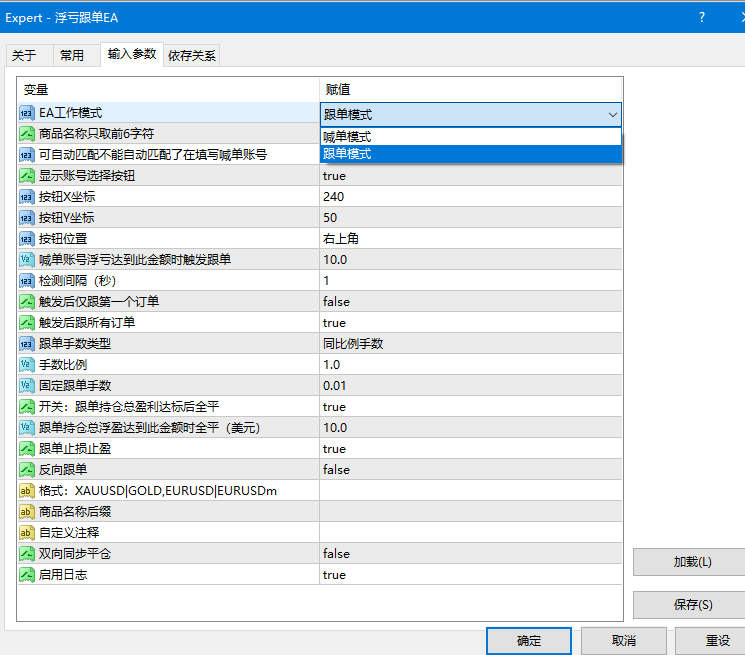
- II. Key Parameter Description
- ━━━━━━━━━━━━━━━━━━━━━━━━━━━━━━
- 【Order Opening Control】
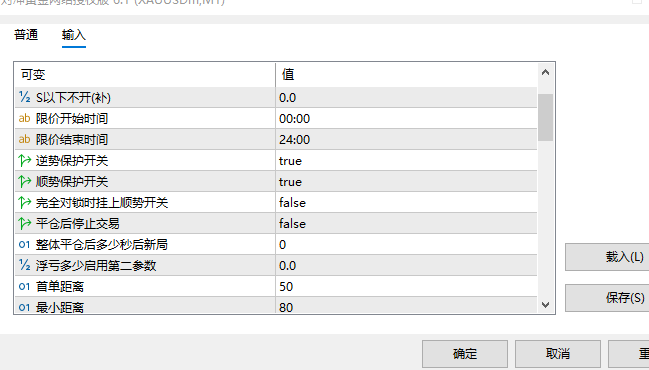
- - First Order Distance (FirstStep): Distance between the first pending order and current price, default 50 pips.
- - Grid Distance (Step): Distance for the first set of grid orders, default 150 pips.
- - Second Grid Distance (TwoStep): Distance for the second set of grid orders, default 150 pips.
- - Minimum Distance (MinDistance): Minimum pending order distance protection, default 80 pips.
- - Trailing Pending Order Step (StepTrallOrders): Step size for pending orders following price movement, default 5 pips.
- - Order Opening Mode (OpenMode): Supports Timezone Mode, Time Interval Mode, and No-Delay Mode.
- 【Lot Size Management】
- - Initial Lot Size (lot): Lot size for the first order, default 0.01.
- - Maximum Lot Size (Maxlot): Upper limit per trade lot size, default 5.0 lots.
- - Incremental Lot Size (PlusLot): Fixed lot increment per grid order, default 0.
- - Lot Multiplier (K_Lot): Multiplier for subsequent grid order lot sizes, default 1.3x.
- - Lot Digits Precision (DigitsLot): Precision for order volume, default 2 decimal places.
- 【Take Profit & Stop Loss】
- - Total Close Amount (CloseAll): Closes all positions when combined Buy/Sell profit reaches this value, default 0.5 USD.
- - Unilateral Close Amount (StopProfit): Closes single-direction positions when profit reaches this value, default 2 USD.
- - Unilateral TP Cumulative Toggle (Profit): Whether the unilateral TP amount increases dynamically with position volume.
- - Stop Loss Amount (StopLoss): Forces stop loss when overall floating loss exceeds this value, default 0 (Disabled).
- - Unilateral Floating Loss Limit (MaxLoss): Stops adding grid positions in that direction when single-side floating loss exceeds this value, default 5000.
- - Unilateral Close-All Loss Limit (MaxLossCloseAll): Forces closure of single-side positions when loss exceeds this value, default 50.
- 【Risk Management & Protection】
- - Counter-Trend Protection (CloseBuySell): Protects positions during adverse trends when enabled, default Enabled.
- - Trend-Following Protection (HomeopathyCloseAll): Triggers protection during strong trending markets when enabled, default Enabled.
- - Full Lock Trend Toggle (Homeopathy): Applies trend-following toggle when fully locked.
- - Stop After Close (Over): Stops opening new trades after closing all overall positions.
- - Wait Time After Close All (NextTime): Waits N seconds after closing all positions before starting a new round.
- 【Price Limits】
- - Do Not Open Buy First Order Above B: Upper price limit for opening the first Buy order.
- - Do Not Open Sell First Order Below S: Lower price limit for opening the first Sell order.
- - Do Not Open Buy Grid Order Above B: Upper price limit for adding Buy grid positions.
- - Do Not Open Sell Grid Order Below S: Lower price limit for adding Sell grid positions.
- - Price Limit Window: Executes price restrictions only during designated time windows.
- 【Other Restrictions】
- - Max Total Orders (Totals): Maximum number of open positions allowed, default 50 orders.
- - Spread Limit (MaxSpread): Stops opening orders when spread exceeds this value, default 500 pips.
- - Broker Leverage Limit (Leverage): Stops running when leverage falls below this value, default 100x.
- - EA Operating Hours: Customizable daily active trading hours for the EA.
- 【Slippage Protection】
- - Slippage Buffer Amount (SlippageBuffer): Adds a buffer amount above the TP threshold, default 0.3.
- - Preset TP (UsePresetTP): Enables server-side preset Take Profit for zero-slippage closure.
- - Preset TP Advance (PresetTP_Advance): Sets preset TP in advance when price reaches 80% of threshold.
- - Slippage Log (LogSlippage): Logs actual execution slippage for every order closure.
- ━━━━━━━━━━━━━━━━━━━━━━━━━━━━━━
- III. Interface Features
- ━━━━━━━━━━━━━━━━━━━━━━━━━━━━━━
- Three quick-action buttons in the bottom right corner of the chart:
- - [C buy]: One-click manual closure of all Buy orders.
- - [C sel]: One-click manual closure of all Sell orders.
- - [Close]: One-click manual closure of all positions.
- Real-time display in the top right corner of the chart:
- - Account Balance (Balance)
- - Account Equity (Equity)
- - Free Margin (FreeMargin)
- - Buy Positions Floating Profit (ProfitB)
- - Sell Positions Floating Profit (ProfitS)
- - Total Floating Profit (Profit)
- ━━━━━━━━━━━━━━━━━━━━━━━━━━━━━━
- IV. Licensing & Authorization
- ━━━━━━━━━━━━━━━━━━━━━━━━━━━━━━
- This EA uses an online license verification mechanism:
- - Automatically connects online to verify authorization when started, refreshing once daily.
- - Authorization is bound to MT5 Account Number + Hardware ID and cannot be used across accounts.
- - Maintains the last verified state during network disruptions to ensure uninterrupted trading.
- - Authorization verification is automatically bypassed in Strategy Tester (backtesting mode).
- ━━━━━━━━━━━━━━━━━━━━━━━━━━━━━━
- V. Usage & Application Notes
- ━━━━━━━━━━━━━━━━━━━━━━━━━━━━━━
- - Best suited for ranging markets; strong trending markets require proper risk management parameters.
- - Recommended for use on ECN accounts; lower spreads yield better performance.
- - Recommended account leverage of 100x or higher.
- - Contact customer service for parameter optimization guidance.
- - Get long-term stable optimized parameters for free.
Use Cases
This product is suitable for traders looking for MT5 EA resources for strategy backtesting, chart analysis, account management, or automated trading assistance. It is recommended to test parameters and compatibility in a demo account environment before live deployment.