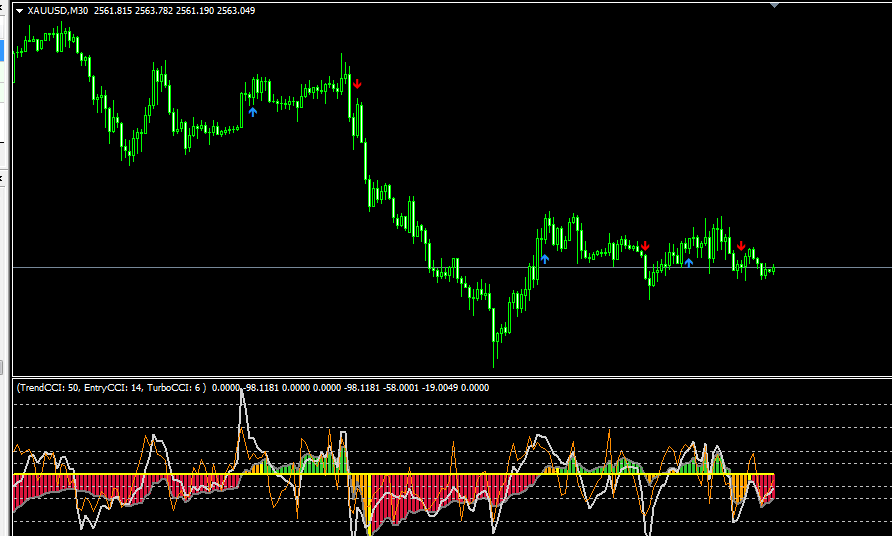
Product details
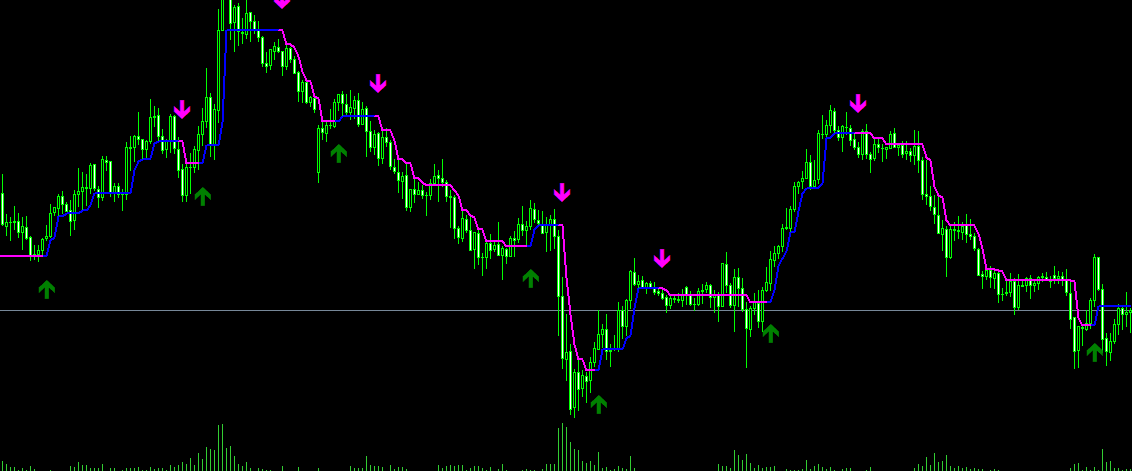
Trend Compass_Signal Edition EA Product Overview
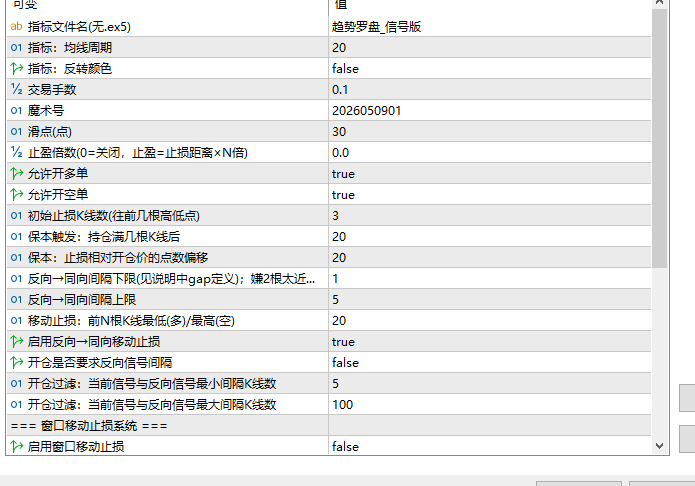
- InpIndicatorName Default: Trend Compass_Signal Edition
- Indicator file name (excluding .ex5), must strictly match the compiled indicator name.
- If the indicator file name has been changed, update it here accordingly.
- InpMAPeriod Default: 20
- EMA moving average period passed to the indicator.
- Higher values make signals smoother and fewer; lower values make signals more frequent and sensitive.
InpInvertColors Default: false
Whether to invert indicator colors. When enabled, buy and sell signal directions are inverted simultaneously.
- II. Basic Trading Settings
- ----------------------------------------------------------------
- InpLots Default: 0.1
- Fixed lot size per trade.
- InpMagic Default: 2026050901
- Magic number, used to identify orders placed by this EA.
- When running multiple EAs on the same account, each EA must be configured with a unique magic number.
InpSlippagePts Default: 30
Maximum allowed slippage (in points). Market orders exceeding this price deviation limit will be rejected.
- InpTPMultiplier Default: 0
- Take profit multiplier.
- 0 = No TP set, relies on stop loss management for exit;
- 2 = Take profit distance = Stop loss distance × 2;
- It is recommended to set to 0 initially and use alongside trailing stop loss.
InpEnableBuy Default: true
Whether to allow buy (long) orders. Set to false to trade sell (short) only.
InpEnableSell Default: true
Whether to allow sell (short) orders. Set to false to trade buy (long) only.
- III. Stop Loss Settings
- ----------------------------------------------------------------
- InpInitSLBars Default: 3
- Initial stop loss takes the extreme values of the previous N candlesticks.
- Long position SL = Lowest price of the previous N closed candlesticks;
- Short position SL = Highest price of the previous N closed candlesticks.
- Higher values make SL looser; lower values make SL tighter.
- InpBreakevenAfterBars Default: 20
- Triggers breakeven logic after holding a position for N candlesticks.
- Upon reaching this candlestick count, the stop loss will be moved near the open price (breakeven level).
- InpBreakevenPoints Default: 20
- Breakeven moves SL to open price ± this point offset.
- Long position: SL moves to Open Price + 20 points (slightly locks in profit);
- Short position: SL moves to Open Price - 20 points.
- Set to 0 to move SL strictly to the open price.
- IV. Trailing Stop Loss (Opposite → Same Signal Trigger)
- ----------------------------------------------------------------
- Note:
- Triggers trailing stop loss only when a new signal in the same direction appears and the candlestick gap between this signal and the previous opposite signal falls within the configured range.
- Example: Holding a long position, a new buy signal appears; looking back for the latest sell signal, if the gap between them is 1 to 5 candlesticks, the SL is moved up to the lowest price of the previous 20 candlesticks.
InpTrailEnable Default: true
Whether to enable this trailing stop loss system.
- InpTrailSignalGapMin Default: 1
- Lower limit of candlestick gap between opposite → same signals.
- Gaps smaller than this value indicate signals are too dense (ranging market), so SL will not be updated.
- Recommended value: 1–3. Increase to 3 if signals are too close.
- InpTrailSignalGapMax Default: 5
- Upper limit of candlestick gap between opposite → same signals.
- Gaps larger than this value indicate the trend has already extended, so SL will not be updated.
- Recommended value: 5–10.
- InpTrailLookbackBars Default: 20
- Trailing stop loss level takes the extreme values of the previous N closed candlesticks.
- Long position: Takes lowest price of previous N candlesticks as new SL;
- Short position: Takes highest price of previous N candlesticks as new SL.
- Higher values make SL looser; lower values make SL tighter.
- V. Entry Signal Filter
- ----------------------------------------------------------------
- Note:
- Used to filter trade entry timing, requiring the gap between the current signal and the previous opposite signal to fall within the specified range to allow opening a trade. Independent of trailing stop loss Gap parameters.
- InpEntryRequireOppositeGap Default: false
- Whether to strictly enforce opposite signal gap filtering.
- false = No filter, open trade on signal;
- true = Open trade only when the gap conditions below are satisfied.
InpEntrySignalGapMin Default: 5
Entry filter: Minimum candlestick gap between current signal and previous opposite signal.
InpEntrySignalGapMax Default: 100
Entry filter: Maximum candlestick gap between current signal and previous opposite signal.
- VI. Window Trailing Stop System
- ----------------------------------------------------------------
- Note:
- Independent of signal trailing stop; both systems can be enabled and combined simultaneously.
- Logic: Activated after breakeven is triggered; every N candlesticks form a window, recording the high/low price of that window. When 2 consecutive candlesticks close breaking through the previous window high/low point, move SL to that window's high/low position.
InpWindowTrailEnable Default: false
Whether to enable the window trailing stop system.
- InpWindowBars Default: 10
- Number of candlesticks per window.
- Higher values mean wider windows and slower SL movement;
- Lower values mean narrower windows and faster SL movement.
- InpWindowMaxUpdates Default: 5
- Maximum number of SL updates.
- 0 = Unlimited updates, continuous tracking.
- InpWindowShowLines Default: true
- Whether to draw window boundary vertical lines and high/low horizontal lines on the chart.
- Useful for observing window division and SL triggers; can be disabled after setup.
- InpDiagLog Default: false
- Whether to output detailed diagnostic logs to the MT5 Experts log window.
- Enable during debugging; recommended to disable during live trading to reduce log output.
- VII. Chart Timeframe
- ----------------------------------------------------------------
- InpWorkTF Default: PERIOD_CURRENT
- EA execution timeframe.
- PERIOD_CURRENT = Follow current chart timeframe (recommended);
- Can also be set to a fixed timeframe, such as PERIOD_M15, PERIOD_H1, etc.
- Indicator signals and SL calculations are based on this timeframe.
- VIII. Run/Pause Button
- ----------------------------------------------------------------
- InpBtnShow Default: true
- Whether to display the "Pause/Run" toggle button on the chart.
InpBtnCorner Default: Top-Left
Button anchor corner, selectable from Top-Left / Top-Right / Bottom-Left / Bottom-Right.
InpBtnX Default: 8
Horizontal pixel offset from anchor corner.
InpBtnY Default: 28
Vertical pixel offset from anchor corner.
InpBtnWidth Default: 80
Button width (pixels).
InpBtnHeight Default: 24
Button height (pixels).
Note: After clicking the button to pause, the EA stops opening new positions, but SL management (breakeven, trailing stop) and manual order management still operate normally.
- IX. Important Considerations
- ================================================================
- 1. Holds only one direction at a time
- Will not open short trades on sell signals when long positions exist, nor open long trades on buy signals when short positions exist.
- Must wait for current position to close before opening new trades.
- 2. Manual orders are also subject to SL management
- Breakeven and trailing stop apply to all open positions of that symbol, regardless of magic number.
- If you do not want manual orders to be managed, pause the EA before opening trades.
3. SL moves forward only (one-way tightening)
Once SL moves to a tighter position, it will not loosen back.
4. Bypass DLL licensing in Strategy Tester
Automatically bypasses online license validation during backtesting, without affecting strategy test results.
Suitable Scenarios
This product is suitable for traders who require MT5 EA resources for strategy backtesting, chart analysis, account management, or automated trading assistance. It is recommended to test parameters and compatibility in a demo account environment before live application.