Product details
Long/Short Channel Trading System - Product Overview
- The Long/Short Channel Trading System is a trend-following indicator based on dynamic channel bands.
- By calculating price volatility ranges, it automatically plots long and short channel bands.
- It determines trend direction based on channel breakouts, offering clear buy/sell signals along with take-profit and stop-loss prompts.
- Applicable Assets: Any currency pair, precious metals, crude oil, etc.
- Recommended Timeframes: H1, H4, D1
- Indicator Type: Trend-following, Channel Breakout
========================================
[Core Principles]
========================================
- Channel Calculation:
- ---------
- 1. Midline (MA): EMA moving average (default period 120)
- 2. Volatility Range: EMA smoothed value of High - Low
- 3. Inner Band: Midline ± Volatility Range × Inner Multiplier (default 1.5)
- 4. Outer Band: Midline ± Volatility Range × Outer Multiplier (default 7.5)
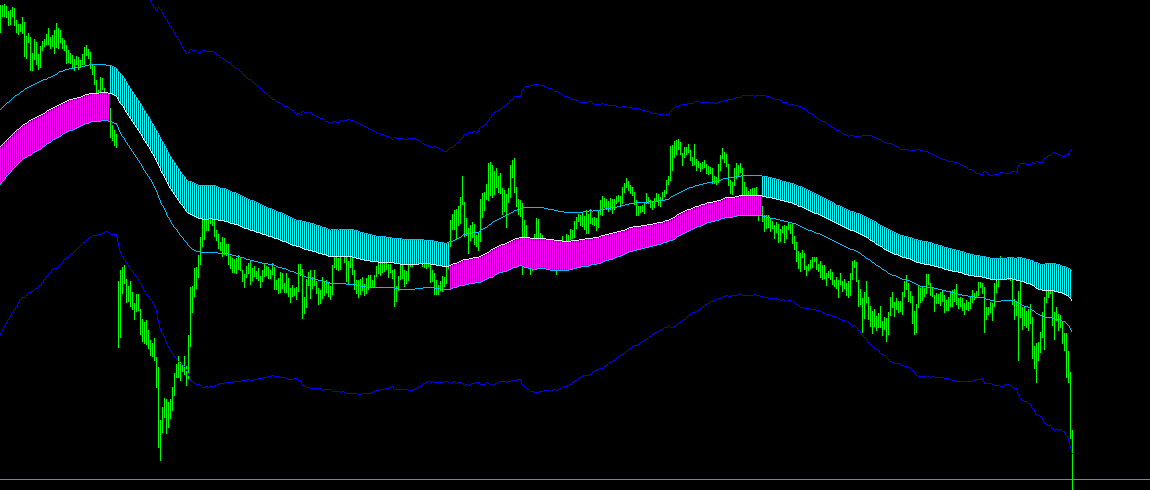
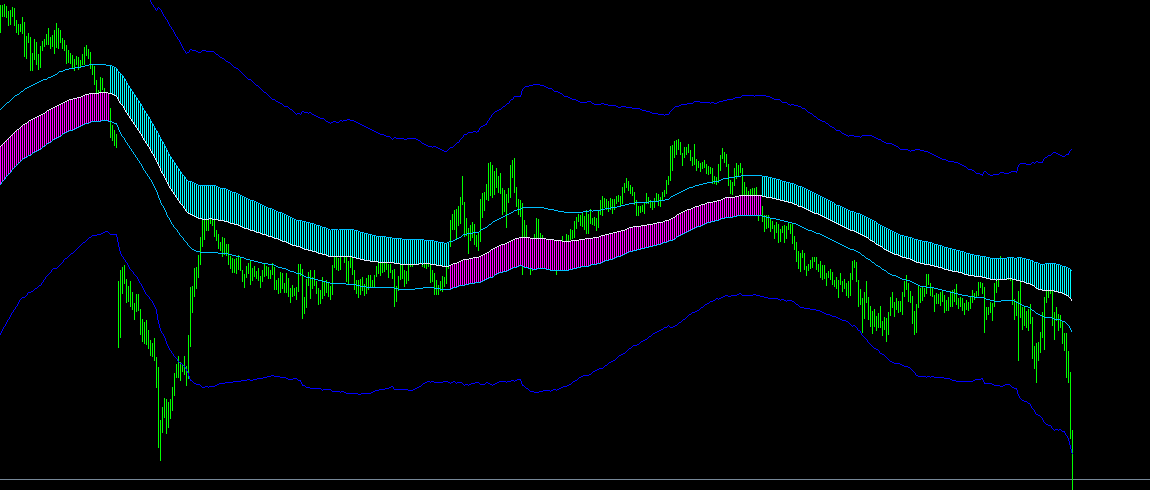
- Five Channel Lines:
- -----------
- • Midline (Blue): Trend direction baseline
- • Upper Inner Band (Sky Blue): Long stop-loss line
- • Lower Inner Band (Sky Blue): Short stop-loss line
- • Upper Outer Band (Blue): Long take-profit line
- • Lower Outer Band (Blue): Short take-profit line
- Color Changes:
- ---------
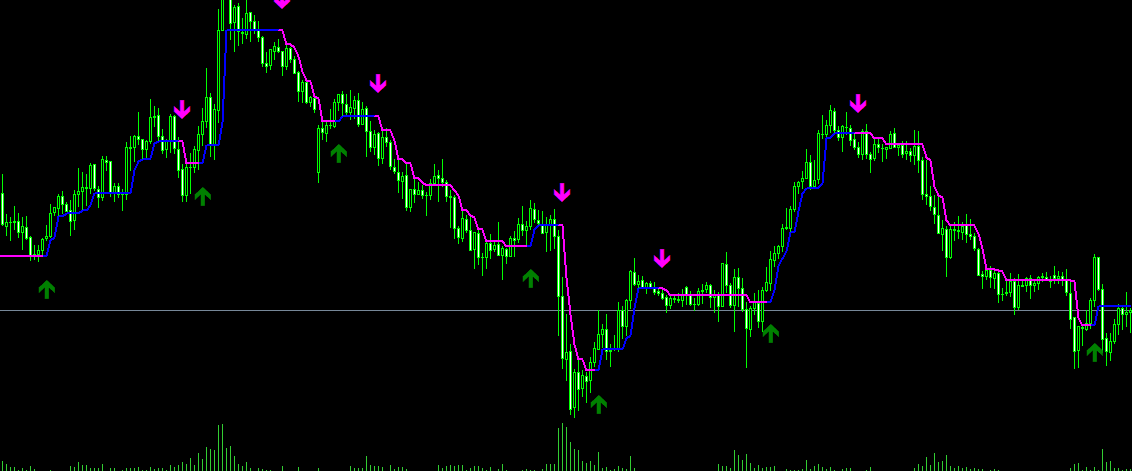
- • Magenta Histogram: Bullish trend (Midline and Lower Inner Band)
- • Cyan Histogram: Bearish trend (Midline and Upper Inner Band)
========================================
[Trading Signals]
========================================
- Entry Signals:
- ---------
- 📈 Buy Signals (Two Modes):
- Mode 1 (Close Crosses Inner Band):
- - Close price breaks above upper inner band
- - Indicator turns Magenta
- - Pop-up alert: "Buy/Long"
- Mode 2 (Midline Direction Value):
- - Midline turns upward
- - Midline breaks above previous high
- - Indicator turns Magenta
- 📉 Sell Signals (Two Modes):
- Mode 1 (Close Crosses Inner Band):
- - Close price breaks below lower inner band
- - Indicator turns Cyan
- - Pop-up alert: "Sell/Short"
- Mode 2 (Midline Direction Value):
- - Midline turns downward
- - Midline breaks below previous low
- - Indicator turns Cyan
- Take-Profit Signals:
- ---------
- 📊 Long Position Take-Profit:
- - Close price breaks above upper outer band
- - Pop-up alert: "Close Long Position (Take Profit)"
- 📊 Short Position Take-Profit:
- - Close price breaks below lower outer band
- - Pop-up alert: "Close Short Position (Take Profit)"
- Stop-Loss Signals:
- ---------
- ⚠️ Long Position Stop-Loss:
- - Close price drops below lower inner band
- - Pop-up alert: "Close Long Position (Stop Loss)"
- ⚠️ Short Position Stop-Loss:
- - Close price breaks above upper inner band
- - Pop-up alert: "Close Short Position (Stop Loss)"
========================================
[Parameter Settings]
========================================
- Color Change Mode:
- ---------
- • Close Crosses Inner Band (0) - Default Mode
- Determines trend based on close price breaking through the inner band
- • Midline Direction Value (1) - Sensitive Mode
- Determines trend based on midline reversal
- Detects trend shifts earlier
- MaPeriods:
- ----------
- • Default: 120
- • Description: Moving average period, controls channel smoothness
- • Recommendations:
- - Short-term trading: 60-100
- - Medium-term trading: 120-200
- - Long-term trading: 200-300
- Inner Band Multiplier:
- ---------
- • Default: 1.5
- • Description: Distance multiplier from midline to inner band
- • Function: Controls stop-loss distance
- • Recommendations:
- - Aggressive: 1.0-1.5
- - Balanced: 1.5-2.0
- - Conservative: 2.0-3.0
- Outer Band Multiplier:
- ---------
- • Default: 7.5
- • Description: Distance multiplier from midline to outer band
- • Function: Controls take-profit distance
- • Recommendations:
- - Short-term: 5.0-7.5
- - Medium-term: 7.5-10.0
- - Long-term: 10.0-15.0
- Entry Alert:
- ---------
- • Default: true
- • Description: Enable pop-up alerts on entry signals
- Exit Alert:
- ---------
- • Default: true
- • Description: Enable pop-up alerts on take-profit/stop-loss signals
========================================
[How to Use]
========================================
- Step 1: Install Indicator
- --------------
- 1. Copy indicator file to: MQL4/Indicators/
- 2. Copy AuthDLL.dll to: MQL4/Libraries/
- 4. Restart MT4
- Step 2: Load Indicator
- --------------
- 1. Open chart for your chosen currency pair
- 2. Locate "Long/Short Channel Trading System" in Navigator
- 3. Drag it onto chart
- 4. Configure parameters (default values recommended initially)
- 5. Check "Allow DLL imports"
- 6. Click OK
- Step 3: Monitor Signals
- --------------
- 1. Wait for indicator color change
- 2. Magenta = Bullish trend
- 3. Cyan = Bearish trend
- 4. Pay attention to pop-up alerts
- Step 4: Execute Trades
- --------------
- Long/Buy:
- - Open long position when indicator turns Magenta
- - Stop-Loss: Lower Inner Band
- - Take-Profit: Upper Outer Band
- Short/Sell:
- - Open short position when indicator turns Cyan
- - Stop-Loss: Upper Inner Band
- - Take-Profit: Lower Outer Band
========================================
[Practical Trading Tips]
========================================
- 💡 Tip 1: Trend Confirmation
- - Wait for complete indicator color shift
- - Ensure close price stabilizes beyond inner band
- - Avoid false breakouts
- 💡 Tip 2: Entry Timing
- - Enter on the first candlestick of color change
- - Or wait for a pullback near midline before entering
- - Improves risk-reward ratio
- 💡 Tip 3: Stop-Loss Placement
- - Set stop-loss strictly according to inner band
- - Do not move stop-loss arbitrarily
- - Capital protection is priority number one
- 💡 Tip 4: Take-Profit Strategies
- - Method 1: Close full position upon reaching outer band
- - Method 2: Close half position at outer band and hold remainder
- - Method 3: Move stop-loss to midline to let profits run
- 💡 Tip 5: Multi-Timeframe Alignment
- - H1 for entry timing
- - H4 for trend direction
- - D1 for major trend overall
- - Multi-timeframe aligned signals are most reliable
- 💡 Tip 6: Avoid Ranging Markets
- - When inner and outer bands are close together
- - It indicates low market volatility
- - Prone to false breakouts
- - Remaining on the sidelines is recommended
- 💡 Tip 7: Parameter Optimization
- - Adjust parameters according to different instruments
- - High-volatility instruments: Increase multipliers
- - Low-volatility instruments: Decrease multipliers
- - Perform regular backtesting for optimization
========================================
[Suitable Scenarios]
========================================
- ✅ Suitable for:
- • Trending markets
- • Moderately volatile assets
- • Medium-to-long term trading
- • Trend-following strategies
- • Breakout trading strategies
- ✅ Ideal Traders:
- • Trend traders
- • Medium-to-long term investors
- • Traders who prefer clear, explicit signals
- • Traders with disciplined stop-loss execution
- ⚠️ Not Suitable for:
- • Sideways ranging markets
- • Ultra short-term scalping
- • High-impact news releases
- • Low-liquidity assets
========================================
[Indicator Advantages]
========================================
- 🎯 Clear Signals
- • Color shifts are clear at a glance
- • Direction is unambiguous
- • Eliminates subjective confusion
- 📊 Defined Stop-Loss & Take-Profit
- • Inner band acts as stop-loss line
- • Outer band acts as take-profit line
- • Clear risk-reward ratio
- ⚡ Automated Alerts
- • Pop-up alerts for entry signals
- • Pop-up alerts for TP/SL levels
- • Never miss key trading opportunities
- 🔧 Flexible Parameters
- • Customizable MA period
- • Customizable channel multipliers
- • Adaptable to various market conditions
- 📈 Trend-Following
- • Automatically identifies trends
- • Rides with trend momentum
- • Lets profits run
- 🔒 License Protection
- • Security DLL authentication system
- • Binds to MT4 account number
- • Automatically expires upon end date
========================================
[Recommended Settings for Different Assets]
========================================
- EURUSD:
- ---------------
- • MaPeriods: 120
- • Inner Multiplier: 1.5
- • Outer Multiplier: 7.5
- • Timeframe: H4
- GBPUSD:
- ---------------
- • MaPeriods: 100
- • Inner Multiplier: 2.0
- • Outer Multiplier: 8.0
- • Timeframe: H4
- XAUUSD (Gold):
- ---------------
- • MaPeriods: 120
- • Inner Multiplier: 2.0
- • Outer Multiplier: 10.0
- • Timeframe: H1
- USOIL (Crude Oil):
- --------------
- • MaPeriods: 100
- • Inner Multiplier: 2.5
- • Outer Multiplier: 10.0
- • Timeframe: H4
- BTCUSD (Bitcoin):
- -----------------
- • MaPeriods: 80
- • Inner Multiplier: 3.0
- • Outer Multiplier: 12.0
- • Timeframe: H4
========================================
[Frequently Asked Questions]
========================================
- Q: What to do if indicator color changes frequently?
- A: This indicates a ranging market. Recommended actions:
- 1. Increase MA period
- 2. Increase inner band multiplier
- 3. Wait for a clearer trend
- Q: How to identify false breakouts?
- A: Observe the following points:
- 1. Check whether price holds level post-breakout
- 2. Check for volume expansion
- 3. Check multi-timeframe alignment
- 4. Wait for confirmation candlestick close
- Q: Why is stop-loss triggered frequently?
- A: Possible reasons:
- 1. Inner band multiplier is set too low
- 2. Market volatility is excessively high
- 3. Inappropriate entry timing
- Recommendation: Increase inner band multiplier
- Q: How to improve win rate?
- A: Recommended practices:
- 1. Trade only during strong trends
- 2. Confirm signal alignment across multiple timeframes
- 3. Wait for pullbacks before entry
- 4. Strictly adhere to stop-loss discipline
- Q: Can this be used for scalping?
- A: Not recommended. This is a trend-following indicator,
- best suited for medium-to-long term trading rather than ultra-short scalping.
- Q: Which color change mode is better?
- A: Each has pros and cons:
- - Mode 1 (Close Crosses Inner Band): Stable signals with minimal lag
- - Mode 2 (Midline Direction Value): Highly sensitive, but generates more false signals
- Beginners are advised to use Mode 1.
========================================
[Risk Disclaimer]
========================================
- ⚠️ Important Notes:
- 1. Indicator signals are not 100% accurate
- 2. Stop-loss protection must always be used
- 3. Avoid over-leveraged trading
- 4. Avoid trading during ranging market conditions
- 5. Combine with fundamental analysis
- ⚠️ Usage Recommendations:
- 1. Test first on a demo account
- 2. Familiarize yourself with indicator characteristics
- 3. Optimize parameter settings
- 4. Formulate a structured trading plan
- 5. Maintain strict execution discipline
Target Audience & Use Cases
This product is suitable for traders looking for MT4 indicator resources for strategy testing, chart analysis, account management, or automated trading assistance. It is recommended to test parameters and compatibility in a demo account environment before actual use.