Product details
MT4 Local Trade Copier EA Product Overview
- [System Overview]
- This system consists of two EAs designed to synchronize orders between MT4 accounts:
- 1. MT4 Server-V2.0.ex4 - Installed on the master account (signal provider) to send trading signals.
- 2. MT4 Receiver-V2.0.ex4 - Installed on the follower account to receive and copy trading signals.
- ================================================================================
- 1. Signal Provider (Master) EA User Manual (MT4 Server-V2.0.ex4)
- ================================================================================
- [Core Features]
- - Automatically monitors all orders on the master account (including market orders and pending orders)
- - Supports multiple receiver accounts receiving signals simultaneously
- - Supports Stop Loss (SL) and Take Profit (TP) synchronization
- - Supports recording trigger prices for pending orders
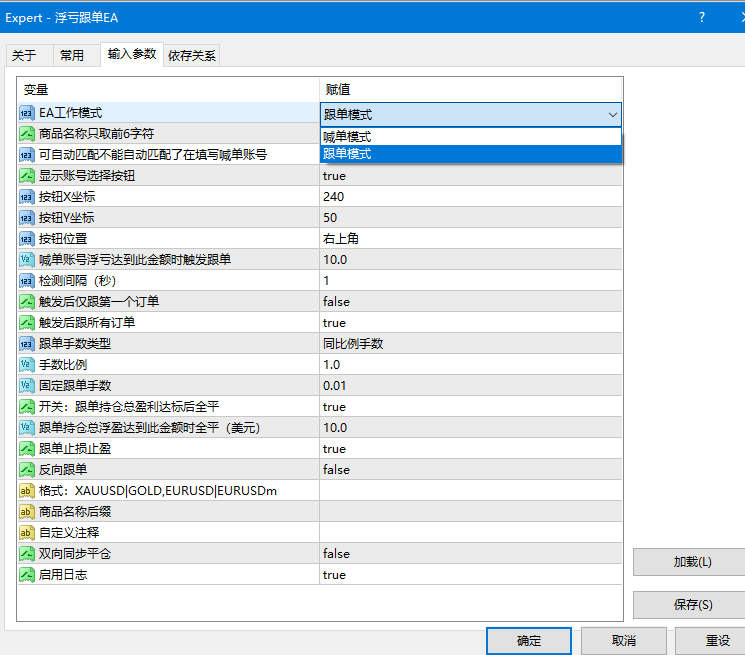
[Parameter Settings]
__Symbol Name First 6 Chars Only: Recommended to enable (1) to avoid symbol suffix differences across different broker platforms.
- [Important Notes]
- - The Master EA must run continuously for real-time synchronization.
- - Running on a VPS is recommended to ensure maximum stability.
- ================================================================================
- 2. Copier (Receiver) EA User Manual (MT4 Receiver-V2.0.mq4)
- ================================================================================
- [Core Features]
- - Real-time copying of master account trades
- - Supports reverse copying (Sell becomes Buy, Buy becomes Sell)
- - Supports lot size multiplier (proportional) or fixed lot size copying
- - Supports symbol name mapping
- - Automatically converts to market orders if pending orders fail
- - Smart order completion/recovery mechanism
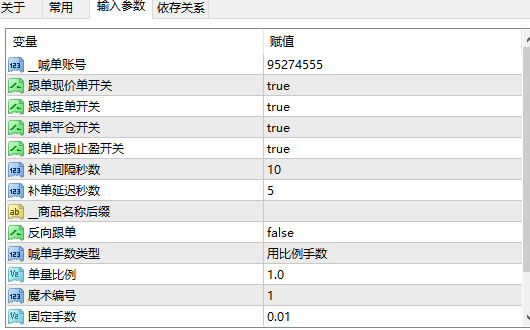
[Important Parameter Details]
- 1. Basic Settings
- - __Master Account Number: Enter the master account's MT4 account number (Required)
- - Magic Number: Identification code for copied orders; setting a unique value is recommended
- 2. Copying Toggles
- - Copy Market Orders Switch: Whether to copy market orders (Buy/Sell)
- - Copy Pending Orders Switch: Whether to copy pending orders (Limit/Stop orders)
- - Copy Close Orders Switch: Whether to synchronize trade closing operations
- - Copy SL/TP Switch: Whether to synchronize Stop Loss and Take Profit modifications
- 3. Lot Size Settings
- - Lot Size Type:
- * Proportional Lots: Copy proportionally (e.g., if Master opens 0.1 lot with a multiplier of 2, Receiver opens 0.2 lots)
- * Custom Lots: Copy using a fixed lot size
- - Lot Multiplier: Multiplier value for proportional copying (Default: 1)
- - Fixed Lots: Fixed lot size when using custom lots (Default: 0.01)
- 4. Reverse Copying
- - Reverse Copy = false: Normal copying (Buy to Buy, Sell to Sell)
- - Reverse Copy = true: Reverse copying (Buy becomes Sell, Sell becomes Buy)
- - SL and TP are automatically swapped during reverse copying
- 5. Symbol Mapping
- - Format: SourceSymbol|TargetSymbol, separated by commas for multiple pairs
- - Example: XAUUSD|GOLD_,EURUSD|EURUSD.
- - Purpose: Resolves symbol naming differences between different platforms/brokers
- 6. Order Recovery Mechanism
- - Check Interval (Seconds): Interval for checking pending order status (Default: 10 seconds)
- - Order Delay (Seconds): Waiting time after a pending order is executed (Default: 5 seconds)
- - Function: Automatically opens a market order if a pending order execution is missed
- 7. Other Parameters
- - __Symbol Suffix: Uniformly add a symbol suffix (e.g., .m)
- - Max Allowed Slippage: Maximum allowed slippage for market orders (Default: 900 points)
- [Workflow]
- 1. Automatically opens a position when a new order is detected
- 2. Automatically closes the position when a trade close is detected
- 3. Automatically modifies SL/TP when changes are detected
- 4. Automatically converts to a market order if a pending order fails
- 5. Periodically checks pending order status and places missing orders
- [Reverse Copying Details]
- When reverse copying is enabled:
- - Buy → Sell
- - Sell → Buy
- - Buy Limit → Sell Stop
- - Sell Limit → Buy Stop
- - Buy Stop → Sell Limit
- - Sell Stop → Buy Limit
- - SL and TP are automatically swapped (Master SL becomes Receiver TP, Master TP becomes Receiver SL)
- [Automatic Symbol Matching]
- The system features a built-in smart symbol matching function:
- - Automatically recognizes common symbols (Gold, EURUSD, GBPUSD, USDJPY, etc.)
- - Automatically strips symbol suffixes (such as c, z, #, ., numbers, etc.)
- - Supports custom mapping rules
- - Falls back to Source Symbol + Suffix if auto-matching fails
- [Status Display]
- The EA displays its operating status in the top-left corner of the chart:
- - "Master EA Version Error" - Red: Version mismatch
- - "Master Account Data Not Updated" - Red: Data has not updated for over 5 seconds
- - "Copier Working Normally..." - Blue: Running properly
- [Frequently Asked Questions]
- Q1: Displays "Not connected to master account"?
- A1: Check if the Master EA is running properly.
Q2: Incorrect lot size copied?
A2: Check the "Lot Size Type", "Lot Multiplier", and "Fixed Lots" settings.
Q3: Symbol names do not match?
A3: Use the "Symbol Mapping" parameter or the "__Symbol Suffix" parameter.
Q4: Pending orders are not copied?
A4: Check if the "Copy Pending Orders Switch" is enabled, or wait for the order recovery mechanism to trigger.
Q5: Incorrect SL/TP during reverse copying?
A5: The system automatically swaps them, so no manual adjustment is needed.
- ================================================================================
- 3. Usage Scenario Examples
- ================================================================================
- [Scenario 1: Single Account Copying]
- Master Account: 12345 (Master EA installed)
- Receiver Account: 67890 (Copier EA installed, __Master Account Number=12345)
- [Scenario 2: Multi-Account Copying]
- Master Account: 12345 (Master EA installed)
- Receiver Account 1: 67890 (Copier EA installed, __Master Account Number=12345)
- Receiver Account 2: 11111 (Copier EA installed, __Master Account Number=12345)
- [Scenario 3: Reverse Copying]
- Master Account: 12345 (Master EA installed)
- Receiver Account: 67890 (Copier EA installed, __Master Account Number=12345, Reverse Copy=true)
- [Scenario 4: Proportional Copying]
- Master opens 0.1 lot → Receiver opens 0.2 lots
- Settings: Lot Size Type = Proportional Lots, Lot Multiplier = 2
- [Scenario 5: Fixed Lot Copying]
- Regardless of the master account lot size, the receiver account always opens 0.01 lots
- Settings: Lot Size Type = Custom Lots, Fixed Lots = 0.01
Use Cases
This product is ideal for traders looking to copy trades across MT4/MT5 platforms for strategy testing, chart analysis, account management, or automated trading support. It is highly recommended to test all parameters and compatibility in a demo account environment before live trading.