Product details
Resonance Martingale Strategy EA Product Overview
- The Resonance Martingale Strategy is a fully automated trading EA that combines Martingale position-scaling with dual-directional long/short trading. It utilizes a hybrid approach—combining fixed lot sizes for the first N orders and multiplier position scaling for subsequent orders—alongside multiple take-profit and stop-loss mechanisms to achieve automated grid-martingale execution.
- [Key Features]
- - Fully automated dual-directional (long/short) trading
- - Fixed lot size for first N orders + multiplier scaling for post-N orders
- - Supports both direct market order scaling and pending order scaling
- - Account-wide profit trailing stop protection
- - Same-direction TP, last-order profit close, and hedge profit close
- - Daily profit target trading pause
- - Cumulative profit TP mechanism
- - Trading session time window control
- - Real-time performance display interface
- ========================================
- [Parameter Description]
- ========================================
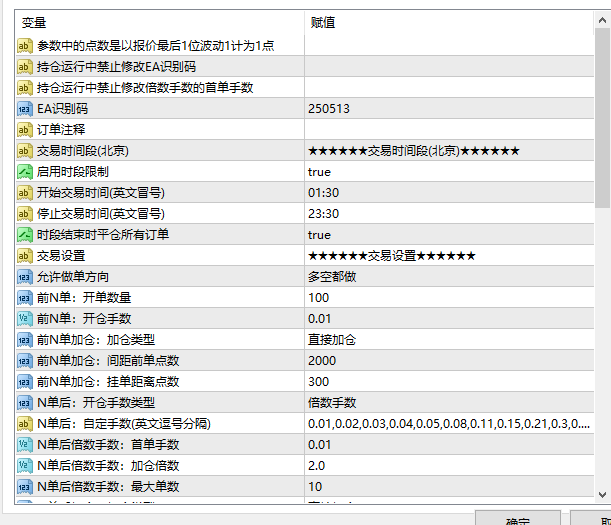
- [Trading Session Settings]
- contrltime1 = true
- - Enable/disable trading session limits
startime1 = "01:30"
- Trading start time (Beijing Time)
stoptime1 = "23:30"
- Trading stop time (Beijing Time)
Close position at session end = true
- Whether to close all open orders when the trading session ends
- [Basic Trading Settings]
- magic = 250513
- - Unique EA Magic Number; set different values when running multiple EAs simultaneously
- Trading Direction
- - Long Only: Opens buy orders only
- - Short Only: Opens sell orders only
- - Both Long & Short: Opens both buy and sell orders simultaneously (Default)
- [First N Orders Settings]
- preoporder = 100
- - Number of initial orders (Default: 100)
prelotsize0 = 0.01
- Lot size per order for the first N orders
preaddnx
- Position scaling mode for first N orders (Direct execution / Pending order)
prespaceadd = 2000
- Grid distance for first N orders (in points)
prespacegd = 300
- Pending order distance for first N orders (in points)
- [Post-N Orders Multiplier Lot Settings]
- lottype
- - Custom Lot Size: Follows the custom lot sequence defined in stringlot
- - Multiplier Lot Size: Scaled based on Initial Lot Size × Lot Multiplier
lotsize1 = 0.01
- Initial lot size
ratioadd = 2
- Lot multiplier (Default: 2x)
maxorder = 10
- Maximum total position scaling orders
spaceadd = 2000
- Position scaling grid distance (in points)
spacegd = 300
- Pending order distance (in points)
- [Same-Direction Take Profit Settings]
- use_tpside = false
- - Enable/disable same-direction take profit
- tptype
- - Points: Take profit based on points
- - Amount: Take profit based on monetary value
tpsidepoint = 100
- Same-direction TP distance in points
tpsidepf = 10
- Same-direction TP monetary amount
- [Overall Profit Trailing Stop Protection]
- usetrail = true
- - Enable/disable overall profit trailing stop protection
trailingp = 800
- Trailing stop activation threshold (in points)
trailstep = 400
- Trailing stop step distance (in points)
- [Overall Stop Loss]
- slall = 0
- - Total account stop-loss amount (0 = Disabled)
- [Daily Take Profit]
- tpday = 0
- - Daily profit target amount to pause trading (0 = Disabled)
tpadd = 0
- Incremental profit target for full close (0 = Disabled)
- [Cumulative Profit Take Profit]
- Enable Cumulative Profit TP = false
- - Enable/disable cumulative profit target close
Cumulative Profit Target = 100
- Target cumulative profit amount
Max Allowed Drawdown = 20
- Maximum allowed drawdown amount
- [Last Order Profit Close]
- use_lastpc = false
- - Enable/disable last-order profit closure
lastpc_order = 6
- Enable last order closure after order N
lastpc_tp = 50
- Take-profit value for the last order
- [Hedge Profit Close]
- use_dcpc = false
- - Enable/disable hedge profit closure
dcpc_order = 6
- Enable hedge close after order N
dcpc_nm = 2
- Number of recent orders to hedge against the initial order
dcpc_tp = 50
- Hedge TP target value
- [On-Screen Display Settings]
- textsize = 10
- - Display font size
textcolor = clrGold
- Text color (Gold)
textxd = 100
- Display X-axis starting position
textyd = 30
- Display Y-axis starting position
texthj = 22
- Text line spacing
- ========================================
- [On-Screen Display Guide]
- ========================================
The following information is displayed on the top-left corner of the chart when the EA is active:
- ✅ System Status: Normal operational status or error notification
- ✅ Execution Direction: Both / Long Only / Short Only
- ✅ Trading Session: Configured active trading period
- ✅ First N Lots: Count and volume of first N orders
- ✅ Post-N Mode: Custom sequence or Multiplier mode
- ✅ Long Orders Count: Current buy orders count and cycle
- ✅ Long Total Volume: Combined lot size of long positions
- ✅ Long Floating P/L: Floating profit/loss for long positions
- ✅ Short Orders Count: Current sell orders count and cycle
- ✅ Short Total Volume: Combined lot size of short positions
- ✅ Short Floating P/L: Floating profit/loss for short positions
✅ Daily P/L: Accumulated total profit/loss for today
✅ Floating P/L: Current open positions floating profit/loss
✅ Cumulative P/L (Displayed when active)
✅ Incremental P/L (Displayed when active)
- ========================================
- [User Guide]
- ========================================
[Basic Setup Steps]
- 1. Select Trading Pair and Timeframe
- - Recommended to run on H1 or H4 charts
- - Best suited for high-volatility assets (Gold, major Forex pairs, etc.)
2. Set Magic Number
- Assign a distinct magic number to each EA instance when running multiple setups on one account
- 3. Configure Direction
- - Trending Market: Select trend-aligned direction (Long Only or Short Only)
- - Ranging Market: Select Both Long & Short
- 4. Set First N Orders Parameters
- - preoporder: Initial orders count (Recommended: 5–20)
- - prelotsize0: Initial order lot size (Recommended: 0.01)
- - prespaceadd: Grid spacing (Configure based on asset volatility)
- 5. Set Post-N Orders Parameters
- - lotsize1: Initial lot size
- - ratioadd: Scaling multiplier (Recommended: 1.5–2.0)
- - maxorder: Maximum order cap (Recommended: 5–10)
- 6. Configure Take Profit & Stop Loss
- - Recommended to enable overall profit trailing stop (usetrail=true)
- - Set overall stop loss (slall) according to account equity
- - Optionally set daily profit targets (tpday)
[Risk Management Recommendations]
- 1. Capital Management
- - Recommended account balance: At least (Initial Lot Size × 10,000)
- - Example: For a 0.01 starting lot size, a minimum balance of $1,000 is recommended
- 2. Multiplier Scaling Control
- - Higher multipliers carry exponentially higher drawdown risk
- - Recommended lot multiplier should not exceed 2.0x
- - Maximum active order cap should not exceed 10
- 3. Stop Loss Setup
- - Always configure account-wide stop-loss (slall)
- - Recommended maximum stop-loss amount should not exceed 20% of total account balance
- 4. Session & News Filters
- - Avoid holding open cycles across major economic news announcements
- - Configure session control to bypass low-liquidity periods
- ========================================
- [Trading Strategy Overview]
- ========================================
- [Martingale Principle]
- - Scales lot size after losing trades
- - A single winning exit recoups all prior accumulated losses
- - Risk: Capital depletes rapidly during continuous, extended one-way market trends
- [Resonance Strategy Characteristics]
- - Uses small fixed lot sizes for the first N orders to minimize initial drawdown exposure
- - Employs multiplier lot scaling for post-N orders to accelerate break-even recovery
- - Dual-directional long and short operation profits from price fluctuations
- - Multiple take-profit mechanisms offer flexible risk and reward control
- [Ideal Market Conditions]
- ✅ Ranging/Consolidating Market: Both Long & Short to capture price oscillations
- ✅ Trending Market: Set execution along the prevailing trend to prevent counter-trend buildup
- ❌ Strong Unidirectional Rally/Crash: High risk; exercise high caution
- ========================================
- [Recommended Trading Assets]
- ========================================
- ✅ Gold (XAUUSD) ★ Top Pick
- - High volatility makes it well-suited for grid martingale strategies
- - Deep liquidity with tight spreads and minimal slippage
- ✅ Forex Currency Pairs
- - EURUSD, GBPUSD, USDJPY, etc.
- - Major currency pairs provide superior liquidity
✅ Crude Oil
- High price volatility; requires larger starting capital
- ========================================
- [Important Notes & Warnings]
- ========================================
- ⚠️ Martingale Strategies Involve High Risk
- - Equity can deplete rapidly during prolonged adverse trends
- - Always implement a hard total stop loss to safeguard capital
- ⚠️ Do NOT Modify the Following Parameters While Positions Are Active
- - Magic Number (magic)
- - Initial lot size for post-N scaling (lotsize1)
- ⚠️ Capital Requirements
- - Ensure sufficient free margin to support position scaling cycles
- - Running this EA on a dedicated trading account is highly recommended
- ⚠️ Network & VPS Requirements
- - EA requires continuous, low-latency network connectivity
- - Operating on a Forex VPS is strongly recommended to prevent connection drops
⚠️ "Allow Live Trading" Must Be Checked
- Ensure "Allow Live Trading" is enabled under the "Common" tab in the EA settings dialog
Suitable Scenarios
This product is designed for traders seeking MT4 EA solutions for backtesting strategies, chart analysis, risk management, or automated trading support. It is strongly advised to thoroughly test all input parameters and system compatibility in a demo account environment before deploying live capital.