Product details
Strategy 0.180267-V1.0 Product Overview
- Strategy 0.180267 is a professional automated trading system generated by StrategyQuant X.
- It utilizes the WPR indicator and Bollinger Bands breakout strategy, combined with smart order management and risk control features.
- It is suitable for high-volatility trading instruments such as Gold (XAUUSD).
- Supported Instruments: Gold (XAUUSD), Forex Currency Pairs
- Recommended Timeframe: H1 (1-Hour Chart)
- Minimum Capital: $500+
- Strategy Type: Breakout Strategy
========================================
【Core Strategy】
========================================
- ✅ WPR Indicator Breakout
- - Uses Williams' Percent Range indicator
- - Identifies overbought and oversold zones
- - Captures price reversal opportunities
- ✅ Bollinger Bands Filter
- - Bollinger Bands breakout confirmation
- - Reduces false breakout signals
- - Improves trading accuracy
- ✅ Smart Order Management
- - Automatic Stop Loss and Take Profit setup
- - Auto-deletes expired orders
- - Supports pending and market orders
- ✅ Trailing Stop Feature
- - Customizable trailing stop
- - SuperTrend exit (optional)
- - Locks in accumulated profits
- ✅ Time Filter
- - No weekend trading option
- - Daily trading hour limits
- - Early Friday close
========================================
【Risk Control】
========================================
🛡️ Multiple Risk Protection Mechanisms
- 1. Stop Loss & Take Profit Settings
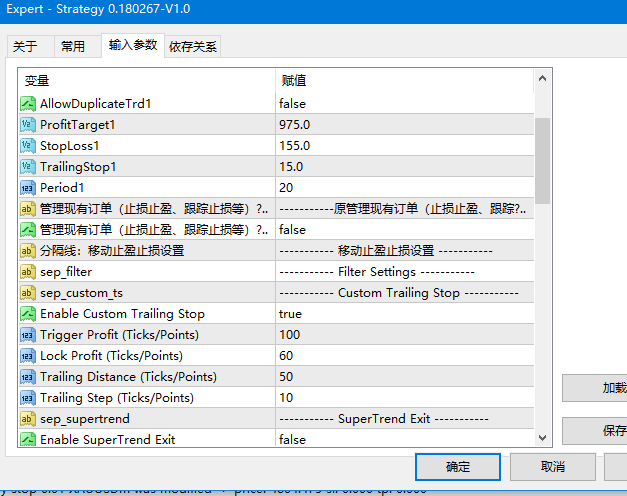
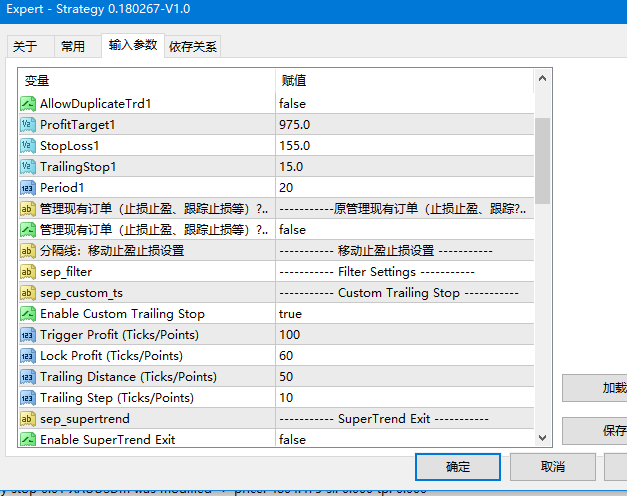
- - Fixed Stop Loss: 155 pips
- - Fixed Take Profit: 975 pips
- - Trailing Stop: 15 pips
- 2. Time Control
- - No trading on weekends
- - Restrict trading hours
- - Close positions at the end of the day
- 3. Daily Trade Limit
- - Set maximum trades per day
- - Prevents overtrading
- - Protects account capital
- 4. Price Distance Limit
- - Limits pending order distance from market price
- - Avoids opening orders at abnormal prices
- - Improves order execution quality
- 5. SL/TP Range Limits
- - Minimum Stop Loss limit
- - Maximum Stop Loss limit
- - Ensures a reasonable risk-reward ratio
========================================
【Key Features】
========================================
- 📊 Professional Strategy
- • Automatically generated by StrategyQuant X
- • Backtested on historical data
- • Optimized parameter settings
- • Stable trading logic
- ⏰ Time Management
- • No weekend trading option
- • Custom trading hours
- • Early Friday close
- • Close positions at the end of the day
- 💰 Money Management
- • Fixed lot size trading
- • Lot multiplier adjustments
- • Lot increment settings
- • Flexible position management
- 🔒 License Protection
- • DLL authorization system
- • Time-limit protection
- • Account binding (optional)
- • Auto-stop upon expiration
- 📢 Real-Time Information Display
- • Chart displays license expiration date
- • Color-coded alert for remaining days
- • Real-time admin announcements
- • Debug mode logging output
========================================
【Suitable Scenarios】
========================================
- ✅ Recommended for the following traders:
- • Traders who prefer breakout strategies
- • Users seeking automated trading
- • Investors with a certain risk tolerance
- • Traders looking to use professional strategies
- • Investors focused on long-term stable trading
- ✅ Suitable for the following market environments:
- • Trending markets
- • High-volatility sessions
- • Instruments with sufficient liquidity
- • H1 timeframe
- ⚠️ Not suitable for:
- • Extreme market conditions (during major news releases)
- • Periods of extremely low liquidity
- • Periods with wide spreads
- • Accounts with insufficient capital
========================================
【Performance Advantages】
========================================
- 🚀 Professional & Reliable
- • Generated by StrategyQuant X
- • Rigorously backtested
- • Optimized parameter settings
- • Stable trading logic
- 🎯 Precise Control
- • Accurate entry signals
- • Strict Stop Loss and Take Profit
- • Comprehensive risk management
- • Smart order management
- 💪 Feature-Rich
- • Multiple trading options
- • Flexible time control
- • Comprehensive money management
- • Robust order processing
- 📈 Flexible Configuration
- • Rich and adjustable parameters
- • Adaptable to different risk preferences
- • Supports multiple trading styles
- • Customizable trailing stop
========================================
【Usage Recommendations】
========================================
- 💡 Tips for Beginners:
- 1. Test on a demo account for 1–2 weeks first
- 2. Start with default parameters
- 3. Set lot size to 0.01 or 0.1
- 4. Enable all risk control features
- 5. Turn on debug mode to monitor operation
- 💡 Advanced Tips:
- 1. Adjust lot size according to account balance
- 2. Optimize WPR and Bollinger Bands parameters
- 3. Adjust Stop Loss and Take Profit ratios
- 4. Set appropriate trading hours
- 5. Regularly review trading logs
- 💡 Risk Management:
- 1. Do not use all your capital
- 2. Keep single trade risk under 2% of account balance
- 3. Avoid trading during major news events
- 4. Withdraw profits regularly
- 5. Stay disciplined and avoid greed
========================================
【Recommended Parameter Settings】
========================================
- Conservative (Low Risk):
- ------------------
- • mmLots: 0.01
- • StopLoss1: 155
- • ProfitTarget1: 975
- • UseCustomTrailingStop: true
- • DontTradeOnWeekends: true
- Balanced (Medium Risk):
- --------------------
- • mmLots: 0.1
- • StopLoss1: 155
- • ProfitTarget1: 975
- • UseCustomTrailingStop: true
- • MaxTradesPerDay: 5
- Aggressive (High Risk):
- ------------------
- • mmLots: 0.2
- • StopLoss1: 200
- • ProfitTarget1: 1200
- • UseCustomTrailingStop: true
- • MaxTradesPerDay: 10
Note: The above configurations are for reference only. Please adjust them according to your account equity and risk tolerance!
Applicable Scenarios
This product is suitable for traders looking for MT4 EA resources for strategy testing, chart analysis, account management, or automated trading assistance. It is recommended to test parameters and compatibility in a demo account environment before live trading.