Product details
3 MA Cross with Alert MTF Product Overview
- 3 MA Cross is a professional triple moving average crossover indicator supporting Multi-Timeframe (MTF) analysis.
- By monitoring crossover relationships between three moving averages of different periods, the indicator provides traders with
- precise entry and exit signals.
- [Key Features]
- - Three fully customizable moving averages (Fast MA, Medium MA, Slow MA)
- - Multi-Timeframe analysis (view signals from other timeframes on any chart period)
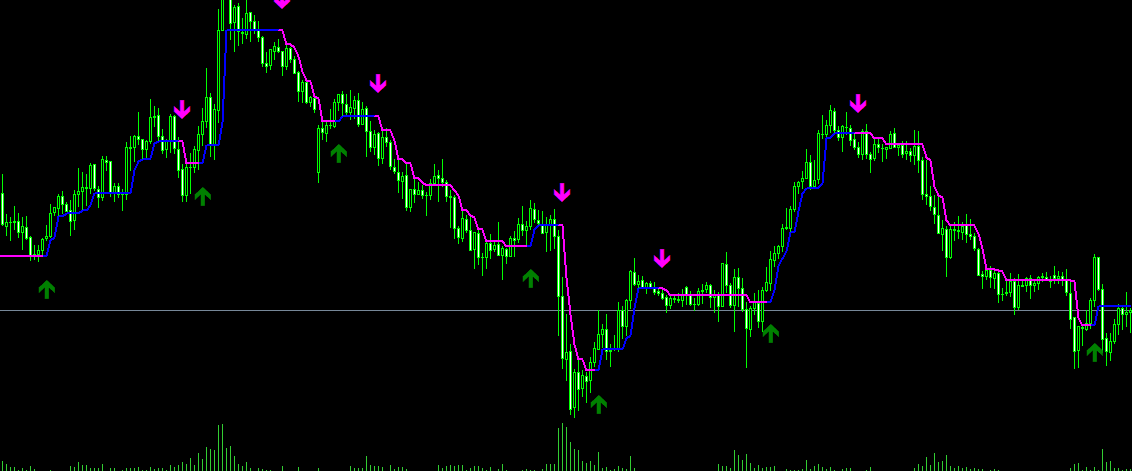
- - Automatically identifies 3 crossover types and displays arrow signals
- - Multiple alert options (Pop-up, Sound, Push Notification, Email)
- - Customizable arrow styles and positions
- ========================================
- [Indicator Logic & Principles]
- ========================================
The indicator utilizes three moving averages:
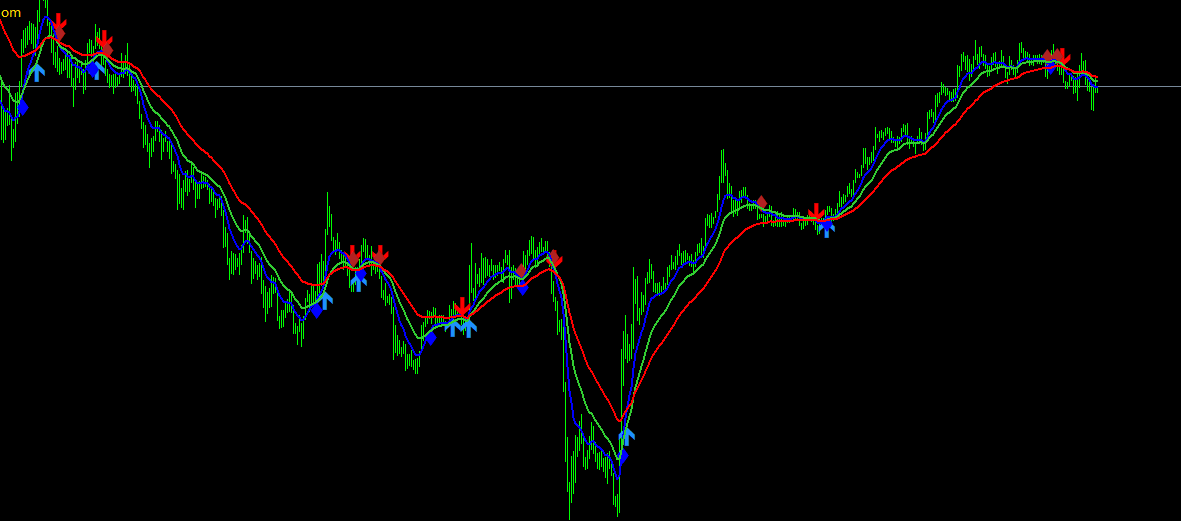
1. Fast MA (Default: 10 period) - Blue Line
Most sensitive response to capture short-term trend changes.
2. Medium MA (Default: 20 period) - Green Line
Balances sensitivity and stability.
3. Slow MA (Default: 40 period) - Red Line
Slowest response, represents the long-term trend.
[Three Crossover Signals]
- Signal 1: Fast MA × Medium MA (Most Sensitive)
- - Fast MA crosses above Medium MA = Buy Signal (Blue Up Arrow)
- - Fast MA crosses below Medium MA = Sell Signal (Blue Down Arrow)
- Signal 2: Fast MA × Slow MA (Medium Strength)
- - Fast MA crosses above Slow MA = Buy Signal (Orange Up Arrow)
- - Fast MA crosses below Slow MA = Sell Signal (Orange Down Arrow)
- Signal 3: Medium MA × Slow MA (Most Stable)
- - Medium MA crosses above Slow MA = Buy Signal (Cyan Up Arrow)
- - Medium MA crosses below Slow MA = Sell Signal (Cyan Down Arrow)
- ========================================
- [Parameter Settings Guide]
- ========================================
- [Timeframe Settings]
- TimeFrame = "Current time frame"
- - Current time frame = Uses the current chart timeframe
- - M1/M5/M15/M30/H1/H4/D1/W1/MN = Specifies a fixed timeframe
- - Example: View H1 timeframe signals directly on an M5 chart
- [Fast MA Settings]
- FasterMA = 10 // Fast MA period
- FasterShift = 0 // Fast MA shift
- FasterMode = 1 // Calculation method (0=SMA, 1=EMA, 2=SMMA, 3=LWMA)
- FasterPrice = PRICE_CLOSE // Applied price
- [Medium MA Settings]
- MediumMA = 20 // Medium MA period
- MediumShift = 0 // Medium MA shift
- MediumMode = 1 // Calculation method
- MediumPrice = PRICE_CLOSE // Applied price
- [Slow MA Settings]
- SlowerMA = 40 // Slow MA period
- SlowerShift = 0 // Slow MA shift
- SlowerMode = 1 // Calculation method
- SlowerPrice = PRICE_CLOSE // Applied price
[Display Settings]
showMAs = true // Display MAs on chart (true=Show, false=Hide)
- [Alert Settings]
- alertsOn = false // Enable alerts
- alertsOnCurrent = true // Alert on current candle (false=Wait for candle close)
- alertsOnFastCrossMiddle = true // Fast × Medium crossover alert
- alertsOnFastCrossSlow = true // Fast × Slow crossover alert
- alertsOnMiddleCrossSlow = true // Medium × Slow crossover alert
- alertsMessage = true // Pop-up alert
- alertsSound = false // Sound alert
- alertsNotify = false // Push notification alert
- alertsEmail = false // Email alert
- [Arrow Settings]
- showarrows_ms = false // Show Medium × Slow crossover arrows
- showarrows_fs = true // Show Fast × Slow crossover arrows
- showarrows_fm = true // Show Fast × Medium crossover arrows
- arrowUpCode_ms = 159 // Medium × Slow up arrow code
- arrowDownCode_ms = 159 // Medium × Slow down arrow code
- arrowUpCode_fs = 233 // Fast × Slow up arrow code
- arrowDownCode_fs = 234 // Fast × Slow down arrow code
- arrowUpCode_fm = 116 // Fast × Medium up arrow code
- arrowDownCode_fm = 116 // Fast × Medium down arrow code
- ArrowsOnFirstBar = false // Display arrows on bar 1
- arrowsFMGap = 0.50 // Fast × Medium arrow gap
- arrowsFSGap = 0.75 // Fast × Slow arrow gap
- arrowsMSGap = 1.00 // Medium × Slow arrow gap
[Interpolation Settings]
Interpolate = true // Smooth transition for MTF mode
- ========================================
- [How to Use]
- ========================================
[Basic Usage]
- 1. Trend Following
- - Bullish trend alignment when Fast > Medium > Slow
- - Bearish trend alignment when Fast < Medium < Slow
- - Trade strictly in the direction of the trend to improve win rate
- 2. Entry Signals
- - Aggressive: Use Fast × Medium crossovers (Blue arrows)
- - Balanced: Use Fast × Slow crossovers (Orange arrows)
- - Conservative: Use Medium × Slow crossovers (Cyan arrows)
- 3. Exit Signals
- - Close position when a reverse crossover signal occurs
- - Close position when price hits the opposite MA line
- - Combine with other indicators to set Stop Loss and Take Profit levels
[Advanced Usage]
- 1. Multi-Timeframe (MTF) Analysis
- - Set TimeFrame = "H1" on an M5 chart
- - Confirm the higher timeframe (H1) trend direction
- - Search for trend-following entry setups on the lower M5 chart
- 2. Parameter Optimization
- - Scalping/Short-Term: Use smaller periods (5/10/20)
- - Swing Trading: Use medium periods (10/20/40)
- - Position Trading: Use larger periods (20/50/100)
- 3. Filtering False Signals
- - Trade only when the three MAs show a clear trend alignment
- - Avoid trading during choppy market conditions with entangled MAs
- - Confirm signals with price action analysis
- ========================================
- [Trading Strategy Examples]
- ========================================
- [Strategy 1: Trend-Following Strategy]
- 1. Wait for all three MAs to align in a bullish order
- 2. Wait for price to pull back near the Medium MA
- 3. A Blue Up Arrow appears (Fast × Medium bullish crossover)
- 4. Enter a BUY position
- 5. Place Stop Loss below the Slow MA
- 6. Exit when an opposing arrow appears or price breaks below Medium MA
- [Strategy 2: Multi-Timeframe Strategy]
- 1. Confirm trend direction on H1 chart
- 2. Switch to M15 chart
- 3. Wait for crossover signals in the direction of H1 trend
- 4. Enter trade with a reasonable Stop Loss
- 5. Target Risk-to-Reward ratio of 1:2 to 1:3
- [Strategy 3: Conservative Strategy]
- 1. Use only Medium × Slow crossover signals (Cyan arrows)
- 2. Wait for pullback confirmation after signal appears
- 3. Enter trade at the end of the pullback
- 4. Hold positions longer for larger profit targets
- ========================================
- [Supported Instruments]
- ========================================
- ✅ Forex Currency Pairs
- - Majors: EURUSD, GBPUSD, USDJPY, etc.
- - Crosses: EURJPY, GBPJPY, etc.
- ✅ Precious Metals
- - Gold (XAUUSD)
- - Silver (XAGUSD)
- ✅ Crude Oil
- - WTI Crude Oil
- - Brent Crude Oil
- ✅ Indices
- - Dow Jones Index
- - Nasdaq Index
- - S&P 500 Index
- ========================================
- [Recommended Timeframes]
- ========================================
- - Scalping: M1, M5 (Quick entries & exits)
- - Short-Term: M15, M30 (Intraday trading)
- - Medium-Term: H1, H4 (Swing trading)
- - Long-Term: D1, W1 (Position/Trend trading)
Use Cases
This product is suitable for traders seeking MT4 indicator resources for strategy testing, chart analysis, account management, or automated trading assistance. It is recommended to test parameters and compatibility in a demo account environment before live trading.